Memory configuration
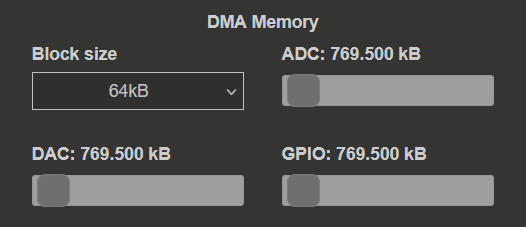
The memory configuration section manages the Deep Memory Mode (DMM) reserved memory region that is shared between the streaming application and other memory-intensive operations.
Configuration options
In this section, the user can specify the following settings:
Block size
Description: The size of packets (chunks) of data that are streamed over the network.
Range: 2 kB to 8 MB
Default: 64 kB
Selection: Dropdown menu
The block size represents the minimum size of the memory block that can be sent over the network. This size is managed by the software (CMemoryManager) and determines how data is chunked for transmission to the desktop application.
Memory allocation
The memory manager features three sliders (ADC, DAC and GPIO) that set the amount of memory allocated to each mode:
ADC: Memory reserved for ADC data streaming (default: 769.5 kB)
DAC: Memory reserved for DAC data streaming (default: 769.5 kB)
GPIO: Memory reserved for GPIO data streaming (default: 769.5 kB) - Not yet implemented
The sliders are used to select the required memory size. Either the entire volume of reserved memory or part of it can be specified.
Note
GPIO streaming mode is not yet implemented.
Choosing the block size
The block size should be determined by the streaming speed and application requirements.
Small block sizes (2 kB - 256 kB)
Use for low streaming speeds
Advantages: Take less time to fill, especially at higher decimation values
Disadvantages: Require more data packets to be transferred over the network
Recommended for: Low sampling rates (< 1 MS/s)
Example: At 10 kS/s with 2 channels and 16-bit resolution, a 64 kB block takes ~1.6 seconds to fill.
Large block sizes (1 MB - 8 MB)
Use for high streaming speeds
Advantages: Enable maximum network transfer performance (fewer transmissions over the network for the same amount of data)
Disadvantages: Take longer to fill at low sampling rates
Recommended for: High sampling rates (> 10 MS/s)
Example: At 62.5 MHz, use a block size of at least 4 MB for optimal performance.
Warning
Filling an 8 MB block at 10 kS/s will take approximately 800 seconds. Choose your block size appropriately.
Memory allocation strategy
The total reserved memory (default 32 MB) must be divided among the three modes (ADC, DAC, GPIO).
Single mode operation
If you only need one mode (e.g., ADC streaming only), you can allocate the entire reserved memory to that mode.
Example:
ADC: 32 MB
DAC: 0 MB
GPIO: 0 MB
Dual mode operation
When running ADC and DAC simultaneously, the memory must be allocated proportionally based on your needs.
Example for balanced ADC/DAC:
ADC: 16 MB
DAC: 16 MB
GPIO: 0 MB
Example for ADC-heavy workload:
ADC: 24 MB
DAC: 8 MB
GPIO: 0 MB
Memory warnings
If a slider number appears in red, there is not enough memory reserved for the selected setting. Use the slider to adjust the reserved memory amount until the value changes back to white.
Note
If you allocate the entire volume to ADC streaming, you won’t be able to use DAC mode as there won’t be enough memory.
Changing reserved memory size
The reserved Deep Memory Mode region default size is 32 MB and can be changed:
Through the System info settings in the web interface
By manually changing the size in the system configuration
Increasing the reserved memory size will allow for:
Larger block sizes
More memory for each streaming mode
Better performance for DAC one-pack mode
Warning
Increasing the reserved memory will reduce the memory available for other applications and the operating system.
Troubleshooting memory errors
Common error: “Not enough memory”
Causes:
Total allocated memory (ADC + DAC + GPIO) exceeds the reserved DMM region
Block size is too large for the available memory
For DAC streaming, no file is selected for data generation
Solutions:
Reduce the memory allocation for one or more modes
Increase the reserved DMM region size
Use a smaller block size
Ensure a valid file is selected for DAC streaming
Next steps
Learn about Data Streaming Limitations to understand how memory affects performance
Configure ADC streaming or DAC streaming based on your memory allocation
Review Advanced Configuration for configuration file management