Known Hardware Issues (Original Gen)
This page lists known hardware issues with Red Pitaya Original Generation platforms. Hardware issues require board modifications or workarounds and have been addressed in Gen 2 boards.
Affected Boards and Models
Boards Covered:
STEMlab 125-14 (HW rev up to 1.1)
SDRlab 122-16 (HW rev 1.0)
SIGNALlab 250-12 (HW rev up to 1.2b)
STEMlab 125-14 4-Input (HW rev up to 1.3)
STEMlab 125-14 Z7020 (HW rev up to 1.1)
Active Issues
These hardware issues affect Original Generation boards and require hardware modifications or workarounds. All issues have been resolved in Gen 2 boards.
I2C System Failures
Affected Hardware: All Original Gen boards
Affected Component: TCA9406DCUR I2C level translator
Severity: Major
Workaround: Hardware modification required
Status: Fixed in Gen 2
Symptoms
I2C communication on the extension connector may fail intermittently or completely, particularly when multiple devices with rise time accelerators are connected to the bus.
Root Cause
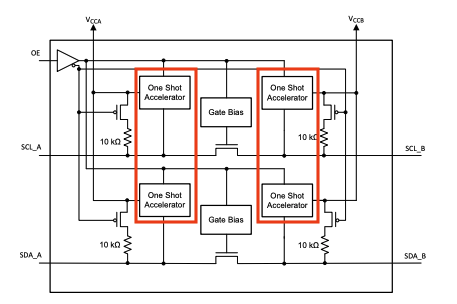
Red Pitaya uses a TCA9406DCUR level translator between PS I2C pins and the I2C pins on the extension connector. The TCA9406DCUR has a built-in rise time accelerator, which is a non-standard feature for level translators.
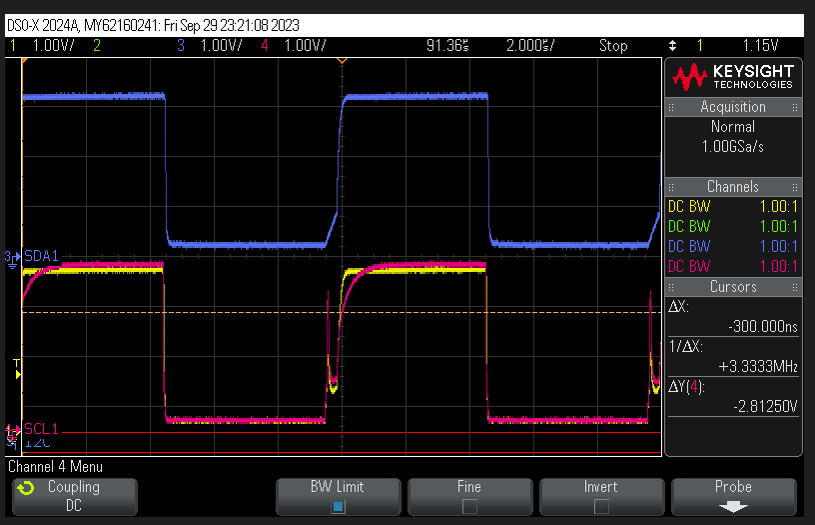
The combination of physical bus design (capacitance) and interaction between multiple rise time accelerators on the I2C bus causes signal integrity issues. The pink trace in the oscilloscope capture below shows the problematic behavior caused by two rise time accelerators interacting on the bus:
Workaround
For Original Gen boards, replace the existing TCA9406DCUR I2C level translator with an alternative device that does not have a rise time accelerator.
Warning
This modification requires advanced soldering skills. All currently available I2C level translators have different pinouts, requiring careful PCB rework or adapter board design.
Gen 2 Resolution
Fixed in Gen 2 boards by replacing the TCA9406DCUR with PCA9306, which does not feature one-shot accelerators.
UART TX Boot Prevention
Affected Hardware: All Original Gen boards Affected Component: UART TX pin on E2 connector Severity: Critical Workaround: Hardware design consideration required Status: Fixed in Gen 2
Symptoms
If an external device drives the UART TX pin high (3.3V) before or during Red Pitaya’s boot sequence, the system may fail to boot properly, preventing user login.
Root Cause
The UART TX pin lacks sufficient drive strength and isolation to handle external devices driving the line during boot. The Zynq PS interprets the external signal as a conflict, causing boot sequence failures.
Workaround
When designing custom extension shields for Original Gen boards:
Add an external buffer with open-drain outputs between your device and the UART TX pin
Include a 3.3V pull-up resistor on the output of the buffer
Ensure external devices do not drive the UART TX pin during Red Pitaya boot
Example Circuit:
Use a buffer IC with open-drain/open-collector outputs (e.g., 74LVC07A)
Connect a 4.7kΩ pull-up resistor from buffer output to 3.3V
Connect buffer output to Red Pitaya UART TX pin
Gen 2 Resolution
Fixed in Gen 2 boards by adding an additional output buffer to the UART TX pin, providing proper isolation and drive strength.
Hardware Design Notes
These are design characteristics that do not affect overall functionality but deviate from the original design intent. Unlike the active issues above, these characteristics are present on both Original Generation and Gen 2 boards and require no workaround.
Slow Analog Input Voltage Range
Affected Hardware: All Red Pitaya boards (Original Generation and Gen 2)
Affected Component: Slow analog inputs AI0-AI3 on the E2 connector
Status: By design — also present on Gen 2 boards
Background
During the original hardware design, the Zynq 7010 XADC unipolar input range was assumed to be 0-0.5 V. The actual unipolar input range of the Zynq XADC is 0-1 V. The slow analog input voltage dividers were therefore designed to map a 0-3.5 V external signal down to what was believed to be the ADC’s full-scale range.
Consequence
With the 30.0 kΩ / 4.99 kΩ voltage divider (ratio ≈ 0.143) and the actual XADC full-scale of 1.0 V:
The actual full-scale input range of the slow analog inputs (AI0–AI3) is 0-7.0 V, not the originally intended 0-3.5 V.
Note
Bipolar mode is unaffected. The XADC bipolar input range of ±0.5 V was correctly assumed during design, so bipolar operation gives the expected ±3.5 V full-scale input range.