3.6.5. LCR meter
The LCR meter can be used from the console.
Note
The preparation of the environment can be found in this chapter.
root@rp-f0b1cb:~# lcr
LCR meter version 3.00-809, compiled at Thu Jul  2 08:50:41 2026

Usage:  lcr freq r_shunt [-v]

        freq               Signal frequency used for measurement in Hz.
        r_shunt            Shunt resistor value in Ω [ 10, 100, 1000, 10000, 100000, 1000000 ]. If set to 0, Automatic ranging is used.
        -v                 Verbose mode

Output: Frequency [Hz], |Z|, Ohm [Ω], P [deg], Ls [H], Cs [F], Rs [Ω], Lp [H], Cp [F], Rp [Ω], Q, D, Xs [H], Gp [S], Bp [S], |Y| [S], -P [deg]
root@rp-f0a235:~# lcr
LCR meter version 2.07-494, compiled at Sat Mar 22 06:11:15 2025

Usage:  lcr freq r_shunt [-v]

        freq               Signal frequency used for measurement Hz.
        r_shunt            Shunt resistor value in Ohms [ 10, 100, 1000, 10000, 100000, 1000000 ]. If set to 0, Automatic ranging is used.
        -v                 Verbose mode
                        Automatic ranging demands Extenson module.

Output: Frequency [Hz], |Z| [Ohm], P [deg], Ls [H], Cs [F], Rs [Ohm], Lp [H], Cp [F], Rp [Ohm], Q, D, Xs [H], Gp [S], Bp [S], |Y| [S], -P [deg]
To run the LCR meter, follow these three steps:
If not using the LCR meter extension shield. Connect the shunt resistor and the DUT (device under test) as shown in the diagram below.
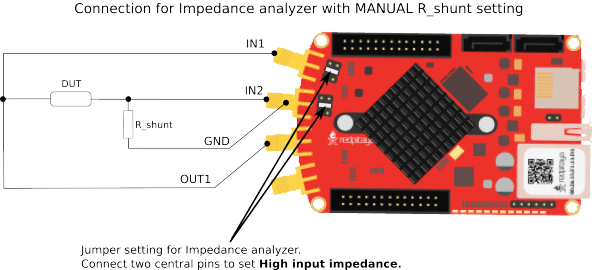
Load the standard FPGA image.
redpitaya> overlay.sh v0.94redpitaya> cat /opt/redpitaya/fpga/fpga_0.94.bit > /dev/xdevcfgLaunch the console application.
root@rp-f01c35:~# lcr 100 100000 -v
Frequency       100 Hz
Z       5.424000 kOmh
Phase   1.364216 deg
L(s)    205.533997 mH
C(s)    -12.324000 uF
R(s)    5.422000 kOmh
L(p)    0.000000 H
C(p)    0.000000 F
R(p)    5.425000 kOmh
Q       0.023815
D       -41.991112
X_s     129.141129
G_p     0.000184
B_p     0.000000
|Y|     0.000184
-P_Y    -1.364216 deg
Source code
The Red Pitaya GitHub repository contains the source code for the lcr utility.