Bar graph with LEDs
Description
This example shows how to make a bar graph by controlling the Red Pitaya on-board LEDs. The number of LEDs that will be turned ON, corresponds to the value of variable p.
Required hardware
Red Pitaya device
Required software
2.00-23 or higher OS
Note
This code is written for 2.00-23 or higher OS. For older OS versions, please check when specific commands were released (a note is added to each command introduced in 2.00 or higher verisons).
SCPI Code Examples
Code - MATLAB®
The code is written in MATLAB. TCP client communication is used to establish socket communication with Red Pitaya, then SCPI commands are sent to configure the various Red Pitaya peripherals. Copy the code below into the MATLAB editor, save the project and press the Run button. Tested on MATLAB 2024b.
%% Define Red Pitaya as TCP/IP object
IP  = 'rp-f0a235.local';        % Input IP of your Red Pitaya...
port = 5000;
RP = tcpclient(IP, port);

%% Open connection with your Red Pitaya

RP.ByteOrder = "big-endian";
configureTerminator(RP,'CR/LF');

%% Define value p from 0 - 100 %
p = 85;    % Set value of p

if p >=(100/9)
     writeline(RP,'DIG:PIN LED0,1')
 else
     writeline(RP,'DIG:PIN LED0,0')
 end

if p >=(100/9)*2
    writeline(RP,'DIG:PIN LED1,1')
else
    writeline(RP,'DIG:PIN LED1,0')
end

if p >=(100/9)*3
    writeline(RP,'DIG:PIN LED2,1')
else
    writeline(RP,'DIG:PIN LED2,0')
end

if p >=(100/9)*4
    writeline(RP,'DIG:PIN LED3,1')
else
    writeline(RP,'DIG:PIN LED3,0')
end

if p >=(100/9)*5
    writeline(RP,'DIG:PIN LED4,1')
else
    writeline(RP,'DIG:PIN LED4,0')
end

if p >=(100/9)*6
    writeline(RP,'DIG:PIN LED5,1')
else
    writeline(RP,'DIG:PIN LED5,0')
end

if p >=(100/9)*7
    writeline(RP,'DIG:PIN LED6,1')
else
    writeline(RP,'DIG:PIN LED6,0')
end

if p >=(100/9)*8
    writeline(RP,'DIG:PIN LED7,1')
else
    writeline(RP,'DIG:PIN LED7,0')
end

clear RP;
Code - Python
#!/usr/bin/env python3

import sys
import redpitaya_scpi as scpi

IP = 'rp-f066c8.local'
rp = scpi.scpi(IP)

if (len(sys.argv) > 2):
    percent = int(sys.argv[2])
else:
    percent = 50

print("Bar showing "+str(percent)+"%")

for i in range(8):
    if (percent > ((i+1) * (100.0/9))):
        rp.tx_txt('DIG:PIN LED' + str(i) + ',' + str(1))
    else:
        rp.tx_txt('DIG:PIN LED' + str(i) + ',' + str(0))

rp.close()
Note
The Python functions are accessible with the latest version of the redpitaya_scpi.py document available on our GitHub. The functions represent a quality-of-life improvement as they combine the SCPI commands in an optimal order and also check for improper user inputs. The code should function at approximately the same speed without them.
For further information on functions please consult the redpitaya_scpi.py code.
Code - LabVIEW
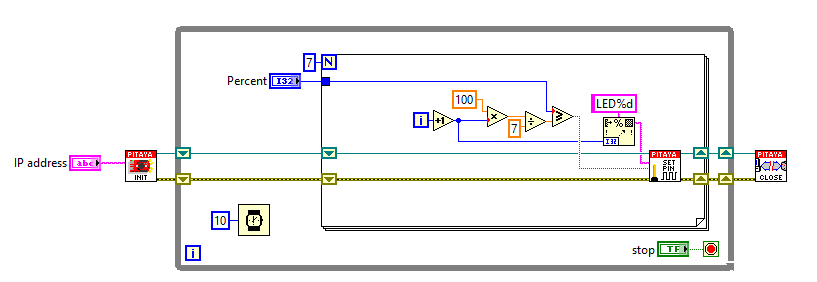
API Code Examples
Note
The API code examples don’t require the use of the SCPI server. Instead, the code should be compiled and executed on the Red Pitaya itself (inside Linux OS). Instructions on how to compile the code and other useful information are here.
Code - C++ API
/* Red Pitaya C++ API example LED Bar graph */
#include <stdio.h>
#include <stdlib.h>
#include <unistd.h>
#include "rp.h"

int main (int argc, char **argv) {
    float percent;

    // percentage can be provided as an argument
    if (argc > 1) {
        percent = atof(argv[1]);
    } else {
        percent = 50.0;
    }
    printf("Bar showing %.1f%%\n", percent);

    // Initialization of API
    if (rp_Init() != RP_OK) {
        fprintf(stderr, "Red Pitaya API init failed!\n");
        return EXIT_FAILURE;
    }

    // Turning on leds based on parameter percent
    for (int i=0; i<8; i++) {
        if (percent > ((i+1)*(100.0/9))) {
            rp_DpinSetState(i+RP_LED0, RP_HIGH);
        } else {
            rp_DpinSetState(i+RP_LED0, RP_LOW);
        }
    }

    // Releasing resources
    rp_Release();

    return EXIT_SUCCESS;
}
Code - Python API
#!/usr/bin/python3

import time
import rp

percent = 50        # Percentage of LED bar turned ON
is_integer = True

# Initialize the interface
rp.rp_Init()

#####! Choose one of two methods, comment the other !#####
#! METHOD 1: Interacting with Registers direclty
led = 0
led_array = [0b00000001, 0b00000010, 0b00000100, 0b00001000, 0b00010000, 0b00100000, 0b01000000, 0b10000000]

while 1:
    led = 0
    percent = input("Enter LED bar percentage: ")

    try:
        # Try to convert input to integer
        int(percent)
    except ValueError:
        is_integer = False      # set flag to false if the conversion fails
    else:
        is_integer = True
        percent = int(percent)  # convert input string to integer

    if is_integer:              # If input is integer
        if not 0 <= percent <= 100:       # In case of not defined percentage display default value
            percent = 50

        print (f"Bar showing {percent}%")

        for i in range(8):                  # Calculate LED percentage
            if percent > (i+1)*(100.0/9):
                led += led_array[i]         # Sum the bits together to get the final register value
        rp.rp_LEDSetState(led)
    else:
        print("Invalid input")
    time.sleep(0.2)

#! METHOD 2: Using Macros
led_array = [rp.RP_LED0, rp.RP_LED1, rp.RP_LED2, rp.RP_LED3, rp.RP_LED4, rp.RP_LED5, rp.RP_LED6, rp.RP_LED7]

while 1:
    percent = input("Enter LED bar percentage: ")

    try:
        # Try to convert input to integer
        int(percent)
    except ValueError:
        is_integer = False      # set flag to false if the conversion fails
    else:
        is_integer = True
        percent = int(percent)  # convert input string to integer

    if is_integer:              # If input is integer
        if not 0 <= percent <= 100:       # In case of not defined percentage display default value
            percent = 50
        print (f"Bar showing {percent}%")

        for i in range(8):                  # Calculate LED percentage
            if percent > (i+1)*(100.0/9):
                rp.rp_DpinSetState(led_array[i],rp.RP_HIGH)
            else:
                rp.rp_DpinSetState(led_array[i],rp.RP_LOW)
    else:
        print("Invalid input")
    time.sleep(0.2)

# Release resources
rp.rp_Release()