Decoding CAN protocol (from file)
Note
An FPGA loopback example for the CAN protocol is not possible as the Logic Analyzer and the CAN protocol share the same digital pins.
Description
This example demonstrates how to decode the CAN protocol using logic analyser commands. Red Pitaya loads the CAN data from the “can_data.bin” file and decodes it. When configuring the example, make sure that the CAN decoder settings match the capture settings.
Here are the possible values for the decoder:
address_format - Shifted =
0, Unshifted =1invert_bit -
0, 1(invert input data signal)decoder lines -
1 - 8(1 == DIO0_P)trigger channel -
LA_T_CHANNEL_1 - LA_T_CHANNEL_8(1 == DIO0_P)
The possible decoded data packet types are:
Payload data - Data payload (control value 0)
Start of frame - Start of frame (SOF) bit, must be dominant (control value 1)
End of frame - End of frame (EOF) bit, must be recessive (control value 2)
Identifier - Identifier bits (control value 3)
Extended identifier - Extended identifier bits (control value 4)
Full identifier - Full identifier bits (control value 5)
Identifier extension bit - Identifier extension bit (control value 6)
Reserved bit 0 and 1 - (control value 7)
Substitute remote request - Substitute remote request (SRR) bit (control value 8)
Data length count - Data length count bits (control value 9)
CRC delimiter - CRC delimiter bit (control value 10)
ACK slot - ACK slot bit (control value 11)
ACK delimiter - ACK delimiter bit (control value 12)
Stuff bit - Stuff bit (control value 13)
End of frame (EOF) must be 7 recessive bits - (control value 14)
Identifier bits 10..4 must not be all recessive - (control value 15)
CRC delimiter must be recessive - (control value 16)
ACK delimiter must be recessive - (control value 17)
Bit rate switch - Bit rate switch (control value 18)
Error state indicator - Error state indicator (control value 19)
Flexible data - Flexible data (control value 20)
Stuff bit error - Stuff bit error (control value 21)
CRC-15 - CRC-15 (control value 22)
CRC-17 - CRC-17 (control value 23)
CRC-21 - CRC-21 (control value 24)
Fixed stuff bit - Fixed stuff bit (control value 25)
Stuff bits - (control value 26)
SBC + FSB + CRC - (control value 27)
Each decoded data packet has the following parameters:
control - Data identifier.
data - Data contained in the protocol.
line name - Line name according to the protocol for which the data was decoded. Must be specified in the decoder settings, otherwise they will not be present.
sampleStart - Starting position in the data to be recognized in samples. 0 = first sample, 1 = second sample, etc. The value is not an integer, since the bit width can be real depending on the protocol. Includes the pretrigger samples.
length - Length of the recognized block in samples.
\[\text{l_{packet}} = \frac{125~\mathrm{MHz}}{\text{decimation} \cdot \text{can_speed}} \cdot \text{bitsInPack}\]bitsInPack - Number of recognized data bits. Multiple of 0.5.
Required hardware
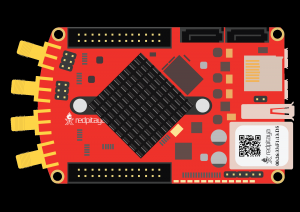
Red Pitaya
Required software
IN DEV - Nightly Build OS
Note
This code is written for IN DEV and will not work with the currently available OS releases. To use this functionality, please install the Nightly Build OS versions.
API Code Examples
Code - Python
#!/usr/bin/python3
""" Example for decoding LA CAN data from file. Settings are also loaded from a file.
"""
import rp_la

rp_cla = rp_la.CLAController()

rp_cla.loadFromFile("can_data.bin", True, 0)

rp_cla.addDecoder("CAN", rp_la.LA_DECODER_CAN)
f = open("can_settings.json", "r", encoding="utf-8")
rp_cla.setDecoderSettings("CAN", f.read())

print("Settings:")
print(rp_cla.getDecoderSettings("CAN"))

print("\nDecoded data\n")
decode = rp_cla.decode("CAN")
for index in range(len(decode)):
    print(rp_cla.getAnnotation(rp_la.LA_DECODER_CAN, decode[index]['control']), " = ", decode[index])
del rp_cla
Modifying decoder settings
#!/usr/bin/python3
"""This script demonstrates how to modify the settings of the CAN decoder in the json files."""

import json
import rp_hw_profiles
import rp_la

# Define callback
class Callback(rp_la.CLACallback):
    def captureStatus(self, controller, isTimeout, bytes, samples, preTrig, postTrig):
        print("captureStatus timeout =",isTimeout,"bytes =",bytes,"samples =",samples,"preTrig =",preTrig,"postTrig =",postTrig)

    def decodeDone(self, controller, name):
        print("Decode done ",name)

can_decoder = "CAN"

decimation = 16
acq_rate = int(rp_hw_profiles.rp_HPGetBaseSpeedHzOrDefault() / decimation)

# Create controller
rp_cla = rp_la.CLAController()
callback = Callback()
rp_cla.setDelegate(callback.__disown__())

# LA FPGA must be loaded/LA Application must be open
rp_cla.initFpga()

# Add decoders
rp_cla.addDecoder(can_decoder, rp_la.LA_DECODER_CAN)

# Get settings from Red Pitaya
can_settings = rp_cla.getDecoderSettings(can_decoder)
print(f"CAN decoder settings: {can_settings}")

# Modify settings
can_settings = json.loads(can_settings)

can_settings["acq_speed"] = acq_rate        # Acquisition speed =! decimation settings
can_settings["fast_bitrate"] = 2000000
can_settings["nominal_bitrate"] = 200000
can_settings["invert_bit"] = 0
can_settings["rx"] = 1                      # CAN RX   (1 - first line.  Valid values are from 1 to 8), 0 == disabled
can_settings["sample_point"] = 87.5

# Save json data to a file
with open("can_settings.json", "w", encoding='utf8') as json_file:
    json.dump(can_settings, json_file, indent=4)

del rp_cla
Save decoder settings to a json file
#!/usr/bin/python3
"""This script demonstrates how to save the settings of the CAN decoder to a json file."""

import json
import rp_la

# Define callback
class Callback(rp_la.CLACallback):
    def captureStatus(self, controller, isTimeout, bytes, samples, preTrig, postTrig):
        print("captureStatus timeout =",isTimeout,"bytes =",bytes,"samples =",samples,"preTrig =",preTrig,"postTrig =",postTrig)

    def decodeDone(self, controller, name):
        print("Decode done ",name)

# Create controller
rp_cla = rp_la.CLAController()
callback = Callback()
rp_cla.setDelegate(callback.__disown__())

# LA FPGA must be loaded/LA Application must be open
rp_cla.initFpga()

# Add decoders
rp_cla.addDecoder("CAN", rp_la.LA_DECODER_CAN)

# Get settings from Red Pitaya
can_settings = rp_cla.getDecoderSettings("CAN")

print(f"CAN decoder settings: {can_settings}")

# Save json data to a file
can_settings = json.loads(can_settings)
with open("can_settings.json", "w", encoding='utf8') as json_file:
    json.dump(can_settings, json_file, indent=4)

del rp_cla