Deep Memory Acquisition comparison
Description
The example shows the comparison between different methods of acquiring data using the Deep Memory Acquisition (DMA) feature of the Red Pitaya for Python API commands.
Required hardware
Red Pitaya device.
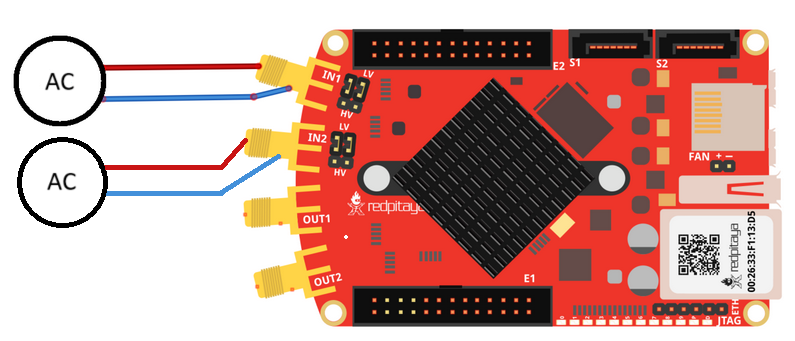
Signal (function) generator.
Wiring example:
Required software
IN-DEV
Note
The Python functions are accessible with the latest version of the redpitaya_scpi.py document available on our GitHub. The functions represent a quality-of-life improvement as they combine the SCPI commands in an optimal order and also check for improper user inputs. The code should function at approximately the same speed without them.
For further information on functions please consult the redpitaya_scpi.py code.
API Code Examples
Code - Python API
There are now three options to get the data from the DMA buffers:
Normal - using the custom buffer classes (for example, i16Buffer).
NumPy - using NumPy arrays.
Direct memory region access - without copying data to NumPy or custom buffers.
The third option is by far the most effective. Test the performance of each method with the code below.
#!/usr/bin/python3

import time
import numpy as np
from rp_overlay import overlay
import rp

fpga = overlay()
#rp.rp_EnableDebugReg()
rp.rp_Init()

memory = rp.rp_AcqAxiGetMemoryRegion()
if (memory[0] != rp.RP_OK):
    print("Error get reserved memory")
    exit(1)

dma_start_address = memory[1]
dma_full_size = memory[2]

bufferSize = 1024 * 1024 * 32
samples = (int)(bufferSize/2)

if (dma_full_size < bufferSize):
    bufferSize = dma_full_size


##### Acquisition #####
# Set Decimation
rp.rp_AcqAxiSetDecimationFactor(rp.RP_DEC_1)

# Set trigger level and delay
rp.rp_AcqSetTriggerLevel(rp.RP_T_CH_1, 0)
rp.rp_AcqAxiSetTriggerDelay(rp.RP_CH_1,  samples)

rp.rp_AcqAxiSetBufferSamples(rp.RP_CH_1, dma_start_address , samples)
rp.rp_AcqAxiEnable(rp.RP_CH_1, True)


# Start Acquisition
print("Acq_start")
rp.rp_AcqStart()

time.sleep(0.1)
# Specify trigger - input 1 positive edge
rp.rp_AcqSetTriggerSrc(rp.RP_TRIG_SRC_NOW)
time.sleep(0.1)

# Trigger state
while 1:
    trig_state = rp.rp_AcqGetTriggerState()[1]
    if trig_state == rp.RP_TRIG_STATE_TRIGGERED:
        break

# Fill state
while 1:
    if rp.rp_AcqAxiGetBufferFillState(rp.RP_CH_1)[1]:
        break

print("ACQ get data")
tp=rp.rp_AcqAxiGetWritePointerAtTrig(rp.RP_CH_1)[1]

# Get data
# RAW
# Fills the passed buffer with data
arr_i16 = np.zeros(samples, dtype=np.int16)
arr_f = np.zeros(samples, dtype=np.float32)
start = time.time()
res = rp.rp_AcqAxiGetDataRawNP(rp.RP_CH_1,tp, arr_i16)
end = time.time()

# Volts
# Fills the passed buffer with data
res = rp.rp_AcqAxiGetDataVNP(rp.RP_CH_1,tp, arr_f)
end2 = time.time()

# Returns a memory region without copying data.
res = rp.rp_AcqAxiGetDataRawDirect(rp.RP_CH_1,tp, samples)
end3 = time.time()

arrays = []
for span in res[1]:
    arr = np.frombuffer(span, dtype=np.int16)
    arrays.append(arr)

print("Time =",end - start, " Data = ", arr_i16)
print("Time =",end2 - end, " Data = ", arr_f)
print("Time =",end3 - end2, " Data = ", arrays)