Deep Memory Acquisition
Description
The example shows how to capture data into two 1024-byte buffers using the Deep Memory Acquisition. DMA can work in parallel with starndard SCPI acquisition.
Limitations:
Buffer size must be a multiple of 8.
The buffer start addresses must be a multiple of 4096 (DDR page size).
To learn more about the Deep Memory Acquisition, please refer to the Deep Memory Acquisition section.
Required hardware
Red Pitaya device.
Signal (function) generator.
Wiring example:
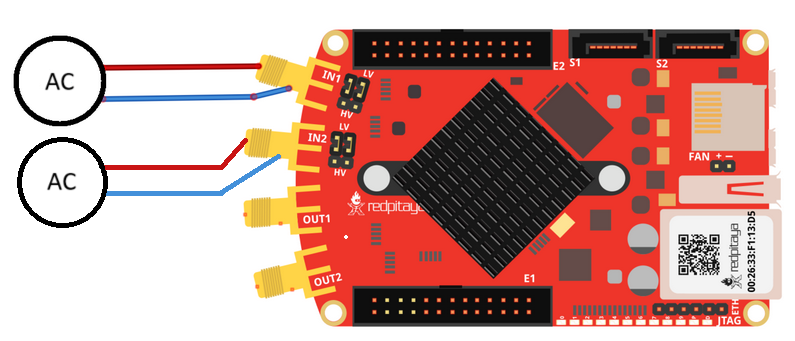
Required software
2.00-23 (STEMlab 125-14).
2.00-30 (all other board models).
SCPI Code Examples
Code - MATLAB®
The code is written in MATLAB. TCP client communication is used to establish socket communication with Red Pitaya, then SCPI commands are sent to configure the various Red Pitaya peripherals. Copy the code below into the MATLAB editor, save the project and press the Run button. Tested on MATLAB 2024b.
clc
close all

IP = 'rp-f0a235.local';           % IP/local address of your Red Pitaya
port = 5000;
RP = tcpclient(IP, port);

% size in samples 16-Bit
DATA_SIZE = 1024*16;          % ((1024 * 1024 * 128) / 2)        %% for 128 MB %%
READ_DATA_SIZE = 1024*16;     % (1024 * 256)                     %% for 128 MB %%

dec = 32;
trig_lvl = 0.2;

%% Open connection with your Red Pitaya
RP.ByteOrder = 'big-endian';
configureTerminator(RP,'CR/LF');

flush(RP);

% Reset Acquisition
writeline(RP,'ACQ:RST');

% Get Memory region
start_address = str2num(writeread(RP,'ACQ:AXI:START?'))
size = str2num(writeread(RP,'ACQ:AXI:SIZE?'));
start_address2 = round(start_address + size/2)

fprintf('Reserved memory Start: %d Size: %d\n', start_address, size);

% Set decimation
writeline(RP,append('ACQ:AXI:DEC ', num2str(dec)));

% Set units
writeline(RP,'ACQ:AXI:DATA:Units VOLTS');

% Set trigger delay for both channels
writeline(RP,append('ACQ:AXI:SOUR1:Trig:Dly ', num2str(DATA_SIZE)));
writeline(RP,append('ACQ:AXI:SOUR2:Trig:Dly ', num2str(DATA_SIZE)));

% Set-up the Channel 1 and channel 2 buffers to each work with half the available memory space.
writeline(RP, append('ACQ:AXI:SOUR1:SET:Buffer ', num2str(start_address ), ',', num2str(size/2)));
writeline(RP, append('ACQ:AXI:SOUR2:SET:Buffer ', num2str(start_address2), ',', num2str(size/2)));

% Enable DMA
writeline(RP, 'ACQ:AXI:SOUR1:ENable ON');
writeline(RP, 'ACQ:AXI:SOUR2:ENable ON');
fprintf('Enable CHA and CHB\n');

% Specify the acquisition trigger
writeline(RP, append('ACQ:TRig:LEV ', num2str(trig_lvl)));


%% ACQUISITION
writeline(RP,'ACQ:START');
writeline(RP,'ACQ:TRig CH1_PE');

%% Wait for trigger
while 1
    trig_rsp = writeread(RP,'ACQ:TRIG:STAT?');
    if strcmp('TD',trig_rsp(1:2))
        fprintf('Triggered\n');
        pause(1);
        break;
    end
end

% wait for fill adc buffer
while 1
    fill_state = writeread(RP,'ACQ:AXI:SOUR1:TRig:FILL?');
    if strcmp('1', fill_state(1:1))
        fprintf('DMA buffer full\n');
        break;
    end
end

% Stop Acquisition
writeline(RP,'ACQ:STOP');

%% Get write pointer at trigger location
posChA = writeread(RP, 'ACQ:AXI:SOUR1:Trig:Pos?');
posChB = writeread(RP, 'ACQ:AXI:SOUR2:Trig:Pos?');

%% Read & plot
data_str   = writeread(RP, append('ACQ:AXI:SOUR1:DATA:Start:N? ', posChA, ',', num2str(READ_DATA_SIZE)));
data_str_2 = writeread(RP, append('ACQ:AXI:SOUR2:DATA:Start:N? ', posChB, ',', num2str(READ_DATA_SIZE)));

data  = str2num(data_str (2:length(data_str  ) - 1));
data2 = str2num(data_str_2(2:length(data_str_2) - 1));

x = linspace(1, READ_DATA_SIZE, READ_DATA_SIZE);
tiledlayout(2,1)

length(x)
length(data)
length(data2)

% CH1 plot
nexttile
plot(x, data)
title('CH1 data')
grid on

% CH2 plot
nexttile
plot(x, data2)
title('CH2 data')


%% Close connection with Red Pitaya
writeline(RP, 'ACQ:AXI:SOUR1:ENable OFF');
writeline(RP, 'ACQ:AXI:SOUR2:ENable OFF');
fprintf('Releasing resources\n');

clear RP;
Code - Python
import time
import matplotlib.pyplot as plt
import numpy as np

import redpitaya_scpi as scpi

IP = 'rp-f0a235.local'          # local IP of Red Pitaya
rp = scpi.scpi(IP)            # open socket connection with Red Pitaya


## size in samples 16Bit
DATA_SIZE = 1024 * 16          # ((1024 * 1024 * 128) / 2)        ## for 128 MB ##
READ_DATA_SIZE = 1024 * 16     # (1024 * 256)                     ## for 128 MB ##

dec = 32
trig_lvl = 0

print("Start program")
## Reset Acquisition
rp.tx_txt('ACQ:RST')

# Get Memory region
start_address = int(rp.txrx_txt('ACQ:AXI:START?'))
size = int(rp.txrx_txt('ACQ:AXI:SIZE?'))
start_address2 = round(start_address + size/2)

print(start_address)
print(size)

print(f"Reserved memory Start: {start_address:x} Size: {size:x}\n")

# Set decimation
rp.tx_txt(f"ACQ:AXI:DEC {dec}")

# Set units
rp.tx_txt('ACQ:AXI:DATA:Units VOLTS')

# Set trigger delay for both channels
rp.tx_txt(f"ACQ:AXI:SOUR1:Trig:Dly {DATA_SIZE}")
rp.tx_txt(f"ACQ:AXI:SOUR2:Trig:Dly {DATA_SIZE}")

# Set-up the Channel 1 and channel 2 buffers to each work with half the available memory space.
rp.tx_txt(f"ACQ:AXI:SOUR1:SET:Buffer {start_address},{size/2}")
rp.tx_txt(f"ACQ:AXI:SOUR2:SET:Buffer {start_address2},{size/2}")

# Enable DMA
rp.tx_txt('ACQ:AXI:SOUR1:ENable ON')
rp.tx_txt('ACQ:AXI:SOUR2:ENable ON')
print('Enable CHA and CHB\n')

# Specify the acquisition trigger
rp.tx_txt(f"ACQ:TRig:LEV {trig_lvl}")


## ACQUISITION

rp.tx_txt('ACQ:START')
rp.tx_txt('ACQ:TRig CH1_PE')


print("Waiting for trigger\n")

# Wait for trigger
while 1:
    rp.tx_txt("ACQ:TRig:STAT?")
    if rp.rx_txt() == 'TD':
        print("Triggered")
        time.sleep(1)
        break

# wait for fill adc buffer
while 1:
    rp.tx_txt('ACQ:AXI:SOUR1:TRig:FILL?')
    if rp.rx_txt() == '1':
        print('DMA buffer full\n')
        break

# Stop Acquisition
rp.tx_txt('ACQ:STOP')

## Get write pointer at trigger location
posChA = int(rp.txrx_txt('ACQ:AXI:SOUR1:Trig:Pos?'))
posChB = int(rp.txrx_txt('ACQ:AXI:SOUR2:Trig:Pos?'))
print(posChA, posChB)

## Read & plot

rp.tx_txt(f"ACQ:AXI:SOUR1:DATA:Start:N? {posChA},{READ_DATA_SIZE}")
signal_str = rp.rx_txt()
rp.tx_txt(f"ACQ:AXI:SOUR2:DATA:Start:N? {posChB},{READ_DATA_SIZE}")
signal_str2 = rp.rx_txt()

print("Data Acquired\n")

buff1 = list(map(float, signal_str.strip('{}\n\r').replace("  ", "").split(',')))
buff2 = list(map(float, signal_str2.strip('{}\n\r').replace("  ", "").split(',')))

plt.plot(buff1, label="Ch1")
plt.plot(buff2, label="Ch2")
plt.legend()
plt.show()


# Writing data into a text file
# with open("Python_SCPI/out.txt", "w", encoding="ascii") as fp:
#     read_size = 0
#
#     while read_size < DATA_SIZE:
#         size1 = READ_DATA_SIZE
#         size2 = READ_DATA_SIZE
#         rp.tx_txt(f"ACQ:AXI:SOUR1:DATA:Start:N? {posChA},{size1}")
#         signal_str = rp.rx_txt()
#         rp.tx_txt(f"ACQ:AXI:SOUR2:DATA:Start:N? {posChB},{size2}")
#         signal_str2 = rp.rx_txt()
#
#         buff1 = list(map(float, signal_str.strip('{}\n\r').replace("  ", "").split(',')))
#         buff2 = list(map(float, signal_str2.strip('{}\n\r').replace("  ", "").split(',')))
#
#         for i in range(0, READ_DATA_SIZE):
#             fp.write(f"{i+1:6d}:  {buff1[i]:6f}\t{buff2[i]:6f}\n")
#
#         posChA += size1
#         posChB += size2
#         read_size += READ_DATA_SIZE
#         print(f"Saved data size {read_size}\n")


## Close connection with Red Pitaya
rp.tx_txt('ACQ:AXI:SOUR1:ENable OFF')
rp.tx_txt('ACQ:AXI:SOUR2:ENable OFF')
print('Releasing resources\n')
print("End program")
rp.close()
Note
The Python functions are accessible with the latest version of the redpitaya_scpi.py document available on our GitHub. The functions represent a quality-of-life improvement as they combine the SCPI commands in an optimal order and also check for improper user inputs. The code should function at approximately the same speed without them.
For further information on functions please consult the redpitaya_scpi.py code.
API Code Examples
Note
The API code examples don’t require the use of the SCPI server. Instead, the code should be compiled and executed on the Red Pitaya itself (inside Linux OS). Instructions on how to compile the code and other useful information are here.
Code - C++ API
/*  Red Pitaya C++ API example of acquiring 1024 samples of data
    on both channels using DMA */

#include <stdio.h>
#include <stdlib.h>
#include <unistd.h>
#include "rp.h"


// size in samples 16 Bit
#define DATA_SIZE 1024          // ((1024 * 1024 * 128) / 2)        /* for 128 MB */
#define READ_DATA_SIZE 1024     // (1024 * 256)                     /* for 128 MB */

int main(int argc, char **argv)
{
    /* Initialise Red Pitaya */
    if (rp_InitReset(false) != RP_OK) {
        fprintf(stderr, "Rp api init failed!\n");
        return -1;
    }

    uint32_t g_adc_axi_start,g_adc_axi_size;
    rp_AcqAxiGetMemoryRegion(&g_adc_axi_start, &g_adc_axi_size);
    printf("Reserved memory Start 0x%X Size 0x%X\n", g_adc_axi_start, g_adc_axi_size);


    /* Set decimation for both channels */
    if (rp_AcqAxiSetDecimationFactor(RP_DEC_1) != RP_OK) {
        fprintf(stderr, "rp_AcqAxiSetDecimationFactor failed!\n");
        return -1;
    }

    /* Set trigger delay for both channels */
    if (rp_AcqAxiSetTriggerDelay(RP_CH_1, DATA_SIZE)  != RP_OK) {
       fprintf(stderr, "rp_AcqAxiSetTriggerDelay RP_CH_1 failed!\n");
       return -1;
    }
    if (rp_AcqAxiSetTriggerDelay(RP_CH_2, DATA_SIZE) != RP_OK) {
       fprintf(stderr, "rp_AcqAxiSetTriggerDelay RP_CH_2 failed!\n");
       return -1;
    }

    /*
    Set-up the Channel 1 and channel 2 buffers to each work with half the available memory space.
    */
    if (rp_AcqAxiSetBufferSamples(RP_CH_1, g_adc_axi_start, DATA_SIZE) != RP_OK) {
        fprintf(stderr, "rp_AcqAxiSetBuffer RP_CH_1 failed!\n");
        return -1;
    }
    if (rp_AcqAxiSetBufferSamples(RP_CH_2, g_adc_axi_start + (g_adc_axi_size / 2), DATA_SIZE) != RP_OK) {
        fprintf(stderr, "rp_AcqAxiSetBuffer RP_CH_2 failed!\n");
        return -1;
    }

    /* Enable DMA on both channels */
    if (rp_AcqAxiEnable(RP_CH_1, true)) {
        fprintf(stderr, "rp_AcqAxiEnable RP_CH_1 failed!\n");
        return -1;
    }
    printf("Enable CHA\n");

    if (rp_AcqAxiEnable(RP_CH_2, true)) {
        fprintf(stderr, "rp_AcqAxiEnable RP_CH_2 failed!\n");
        return -1;
    }
    printf("Enable CHB\n");

    /* Specify the acquisition trigger */
    rp_AcqSetTriggerLevel(RP_T_CH_1, 0);

    /* Start the acquisition */
    if (rp_AcqStart() != RP_OK) {
        fprintf(stderr, "rp_AcqStart failed!\n");
        return -1;
    }
    printf("ACQ Started\n");


    /* Specify trigger source */
    rp_AcqSetTriggerSrc(RP_TRIG_SRC_CHA_PE);
    rp_acq_trig_state_t state = RP_TRIG_STATE_TRIGGERED;

    /* Wait for the triggering moment */
    /* while(1){
        rp_AcqGetTriggerState(&state);
        if(state == RP_TRIG_STATE_TRIGGERED){
            sleep(1);
            break;
        }
    } */

    /* Wait until both buggers are full/data is acquired */
    bool fillState = false;
    while (!fillState) {
        if (rp_AcqAxiGetBufferFillState(RP_CH_1, &fillState) != RP_OK) {
            fprintf(stderr, "rp_AcqAxiGetBufferFillState RP_CH_1 failed!\n");
            return -1;
        }
    }

    /* Stop the acquisition */
    rp_AcqStop();
    printf("Stop acq\n");

    /* Get write pointer on the triggering location */
    uint32_t posChA,posChB;
    rp_AcqAxiGetWritePointerAtTrig(RP_CH_1, &posChA);
    rp_AcqAxiGetWritePointerAtTrig(RP_CH_2, &posChB);

    /* Allocate memory for the data */
    int16_t *buff1 = (int16_t *)malloc(READ_DATA_SIZE * sizeof(int16_t));
    int16_t *buff2 = (int16_t *)malloc(READ_DATA_SIZE * sizeof(int16_t));

    int read_size = 0;

    /* Writing data into a text file */
    FILE *fp = fopen ("out.txt", "w");

    int line = 1;
    while (read_size < DATA_SIZE){
        uint32_t size1 = READ_DATA_SIZE;
        uint32_t size2 = READ_DATA_SIZE;
        rp_AcqAxiGetDataRaw(RP_CH_1, posChA, &size1, buff1);
        rp_AcqAxiGetDataRaw(RP_CH_2, posChB, &size2, buff2);
        for (int i = 0; i < READ_DATA_SIZE; i++) {
            fprintf(fp,"%d:  %d\t%d\n",line++, buff1[i], buff2[i]);
        }
        posChA += size1;
        posChB += size2;
        read_size += READ_DATA_SIZE;
        printf("Saved data size %d\n", read_size);
    }

    /* Releasing resources */
    rp_AcqAxiEnable(RP_CH_1, false);
    rp_AcqAxiEnable(RP_CH_2, false);

    rp_Release();

    free(buff1);
    free(buff2);

    fclose(fp);
    return 0;
}
Code - Python API
Note
The new functions that return the data directly into the NumPy buffer (NumPy tab) are a lot faster than the previous iteration (Normal tab), especially noticeable on longer data sequences. The passed NumPy buffer must either have “dtype=np.float32”, when acquiring data in Volts or “dtype=np.int16” when acquiring RAW data.
#!/usr/bin/python3
"""Example of DMA acquisition of 1024-samples of data on both channels"""

import rp

## size in samples 16 Bit
DATA_SIZE = 1024            # ((1024 * 1024 * 128) / 2)        ## for 128 MB ##
READ_DATA_SIZE = 1024       # (1024 * 256)                     ## for 128 MB ##

dec = rp.RP_DEC_1
trig_lvl = 0.2

# Initialize the interface
rp.rp_Init()


### Setting up DMA ###
# Get Memory region
memoryRegion = rp.rp_AcqAxiGetMemoryRegion()
g_adc_axi_start = memoryRegion[1]
g_adc_axi_size = memoryRegion[2]
print(f"Reserved memory Start: {g_adc_axi_start:x} Size: {g_adc_axi_size:x}\n")

# Set decimation
rp.rp_AcqAxiSetDecimationFactor(dec)

# Set trigger delay for both channels
rp.rp_AcqAxiSetTriggerDelay(rp.RP_CH_1, DATA_SIZE)
rp.rp_AcqAxiSetTriggerDelay(rp.RP_CH_2, DATA_SIZE)

# Set-up the Channel 1 and channel 2 buffers to each work with half the available memory space.

rp.rp_AcqAxiSetBufferSamples(rp.RP_CH_1, g_adc_axi_start, DATA_SIZE)
rp.rp_AcqAxiSetBufferSamples(rp.RP_CH_2, int(g_adc_axi_start + int(g_adc_axi_size/2)), DATA_SIZE)

# Enable DMA on both channels
rp.rp_AcqAxiEnable(rp.RP_CH_1, True)
print("Enable CHA\n")
rp.rp_AcqAxiEnable(rp.RP_CH_2, True)
print("Enable CHB\n")

# Specify the acquisition trigger
rp.rp_AcqSetTriggerLevel(rp.RP_T_CH_1, trig_lvl)


### Acquisition ###
# Start the DMA acquisition
rp.rp_AcqStart()
print("ACQ Started\n")

# Specify trigger source
rp.rp_AcqSetTriggerSrc(rp.RP_TRIG_SRC_CHA_PE)
state = rp.RP_TRIG_STATE_TRIGGERED

# Wait for the triggering moment
# while 1:
#    state = rp.rp_AcqGetTriggerState()[1]
#    if state == rp.RP_TRIG_STATE_TRIGGERED:
#        print("Triggered")
#        time.sleep(1)
#        break

# Wait until both buggers are full/data is acquired
fillState = False

while not fillState:
    fillState = rp.rp_AcqAxiGetBufferFillState(rp.RP_CH_1)[1]
print("DMA buffer full")

# Stop the acquisition
rp.rp_AcqStop()
print("Stop DMA acq\n")

# Get write pointer on the triggering location
posChA = rp.rp_AcqAxiGetWritePointerAtTrig(rp.RP_CH_1)[1]
posChB = rp.rp_AcqAxiGetWritePointerAtTrig(rp.RP_CH_2)[1]


# Allocate memory for the data
buff1 = rp.i16Buffer(READ_DATA_SIZE)
buff2 = rp.i16Buffer(READ_DATA_SIZE)


# Writing data into a text file
with open("out.txt", "w", encoding="ascii") as fp:
    read_size = 0

    while read_size < DATA_SIZE:
        size1 = READ_DATA_SIZE
        size2 = READ_DATA_SIZE
        rp.rp_AcqAxiGetDataRaw(rp.RP_CH_1, posChA, size1, buff1.cast())
        rp.rp_AcqAxiGetDataRaw(rp.RP_CH_2, posChB, size2, buff2.cast())
        for i in range(0, READ_DATA_SIZE):
            fp.write(f"{i+1:6d}:  {buff1[i]:6d}\t{buff2[i]:6d}\n")

        posChA += size1
        posChB += size2
        read_size += READ_DATA_SIZE
        print(f"Saved data size {read_size}\n")


### Releasing resources ###
print("\nReleasing resources\n")
rp.rp_AcqAxiEnable(rp.RP_CH_1, False)
rp.rp_AcqAxiEnable(rp.RP_CH_2, False)

rp.rp_Release()
#!/usr/bin/python3
"""Example of DMA acquisition of 1024-samples of data on both channels"""

import numpy as np
import rp


## Data size in samples 16 bit
bufferSize = 1024                                           # ((1024 * 1024 * 128) / 2)        ## for 128 MB ##

dec = rp.RP_DEC_1
trig_lvl = 0.2
dma_data  = np.zeros((bufferSize), dtype=np.int16)          #! np.float32 for Volts data
dma_data2 = np.zeros((bufferSize), dtype=np.int16)          #! np.int16 for Raw data

# Initialize the interface
rp.rp_Init()

### Setting up DMA ###
# Get Memory region
memoryRegion = rp.rp_AcqAxiGetMemoryRegion()
g_adc_axi_start = memoryRegion[1]
g_adc_axi_size = memoryRegion[2]
print(f"Reserved memory Start: {g_adc_axi_start:x} Size: {g_adc_axi_size:x}\n")

# Set decimation
rp.rp_AcqAxiSetDecimationFactor(dec)

# Set trigger delay for both channels
rp.rp_AcqAxiSetTriggerDelay(rp.RP_CH_1, bufferSize)
rp.rp_AcqAxiSetTriggerDelay(rp.RP_CH_2, bufferSize)

acq1_start_address = g_adc_axi_start
acq2_start_address = int(g_adc_axi_start + (g_adc_axi_size/2))

# Set-up the Channel 1 and channel 2 buffers to each work with half the available memory space.
rp.rp_AcqAxiSetBufferSamples(rp.RP_CH_1, acq1_start_address, bufferSize)
print(f"Reserved memory for IN1 Start: {acq1_start_address:x} Size: {bufferSize:x} End: {acq1_start_address + bufferSize:x}\n")
rp.rp_AcqAxiSetBufferSamples(rp.RP_CH_2, acq2_start_address, bufferSize)
print(f"Reserved memory for IN1 Start: {acq2_start_address:x} Size: {bufferSize:x} End: {acq2_start_address + bufferSize:x}\n")


# Enable DMA on both channels
rp.rp_AcqAxiEnable(rp.RP_CH_1, True)
print("Enable CHA\n")
rp.rp_AcqAxiEnable(rp.RP_CH_2, True)
print("Enable CHB\n")

# Specify the acquisition trigger
rp.rp_AcqSetTriggerLevel(rp.RP_T_CH_1, trig_lvl)

### Acquisition ###
# Start the DMA acquisition
rp.rp_AcqStart()
print("ACQ Started\n")

# Specify trigger source
rp.rp_AcqSetTriggerSrc(rp.RP_TRIG_SRC_CHA_PE)
state = rp.RP_TRIG_STATE_TRIGGERED

## Wait for the triggering moment
# while 1:
#     state = rp.rp_AcqGetTriggerState()[1]
#     if state == rp.RP_TRIG_STATE_TRIGGERED:
#         print("Triggered")
#         time.sleep(0.1)
#         break


# Wait until both buggers are full/data is acquired
fillState = False

while not fillState:
    fillState = rp.rp_AcqAxiGetBufferFillState(rp.RP_CH_1)[1]
print("DMA buffer full")

# Stop the acquisition
rp.rp_AcqStop()
print("Stop DMA acq\n")

# Get write pointer on the triggering location
posChA = rp.rp_AcqAxiGetWritePointerAtTrig(rp.RP_CH_1)[1]
posChB = rp.rp_AcqAxiGetWritePointerAtTrig(rp.RP_CH_2)[1]

rp.rp_AcqAxiGetDataRawNP(rp.RP_CH_1, posChA, dma_data)
rp.rp_AcqAxiGetDataRawNP(rp.RP_CH_2, posChB, dma_data2)

print("Captured data:")
print("N     CH1               CH2")
for i in range(0, bufferSize, 1):
    print(f"{i+1:<4}  {dma_data[i]:<16}  {dma_data2[i]:<16}")

### Releasing resources ###
print("\nReleasing resources\n")
rp.rp_AcqAxiEnable(rp.RP_CH_1, False)
rp.rp_AcqAxiEnable(rp.RP_CH_2, False)

rp.rp_Release()