STEMlab 125-14 Gen 2
Overview
The STEMlab 125-14 Gen 2 is Red Pitaya’s second-generation board featuring improved analog frontend architecture and USB-C connectivity. Built around the AMD (Xilinx) Zynq 7010 SoC, it combines dual-core ARM processing with FPGA programmability for versatile signal processing applications.
Features
Improved Gen 2 frontend architecture
14-bit, 125 MS/s ADC and DAC
Dual-core ARM Cortex-A9 processor
FPGA AMD (Xilinx) Zynq 7010 SoC
512 MB RAM
16 digital I/Os, 4 analog inputs, 4 analog outputs
Multiple communication interfaces: I2C, SPI, UART, CAN
USB-C connectivity for power and console
Quick Reference
Category |
Key Specifications |
|---|---|
ADC |
2 channels, 14-bit, 125 MS/s, DC-60 MHz |
DAC |
2 channels, 14-bit, 125 MS/s, DC-60 MHz |
Processor |
Dual-core ARM Cortex-A9 |
FPGA |
AMD Zynq 7010 SoC |
RAM |
512 MB |
Digital I/O |
16 GPIOs @ 3.3V |
Analog I/O |
4 inputs (12-bit), 4 outputs (8-bit) |
Jitter Performance |
20 ps RMS @ 40 MHz |
Connectivity |
Ethernet, USB-C, Extension connectors |
Special Features |
/ |
Board Layout & Pinout

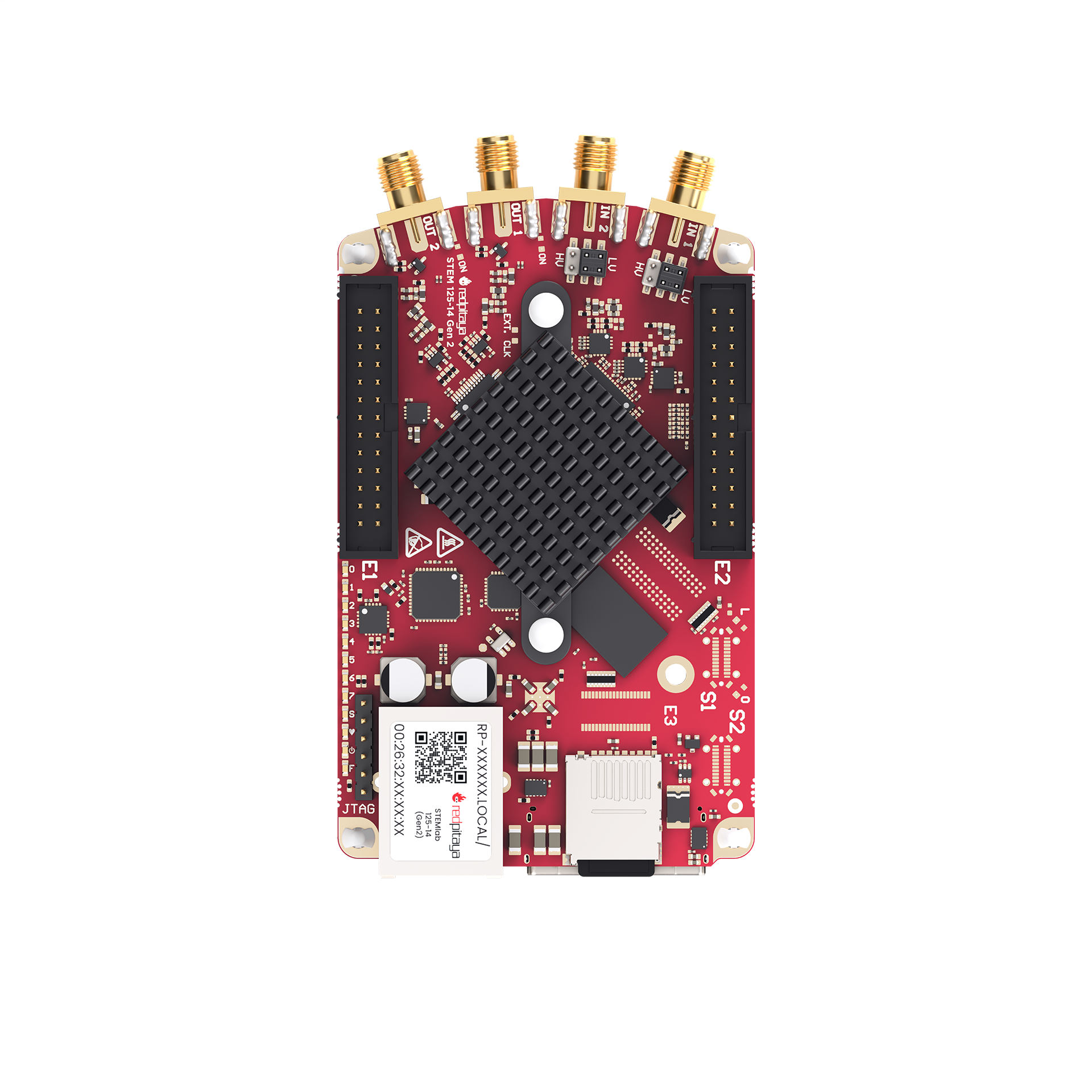
The pinout diagram shows all external connectors including RF inputs/outputs (IN1, IN2, OUT1, OUT2) and extension connectors (E1, E2).
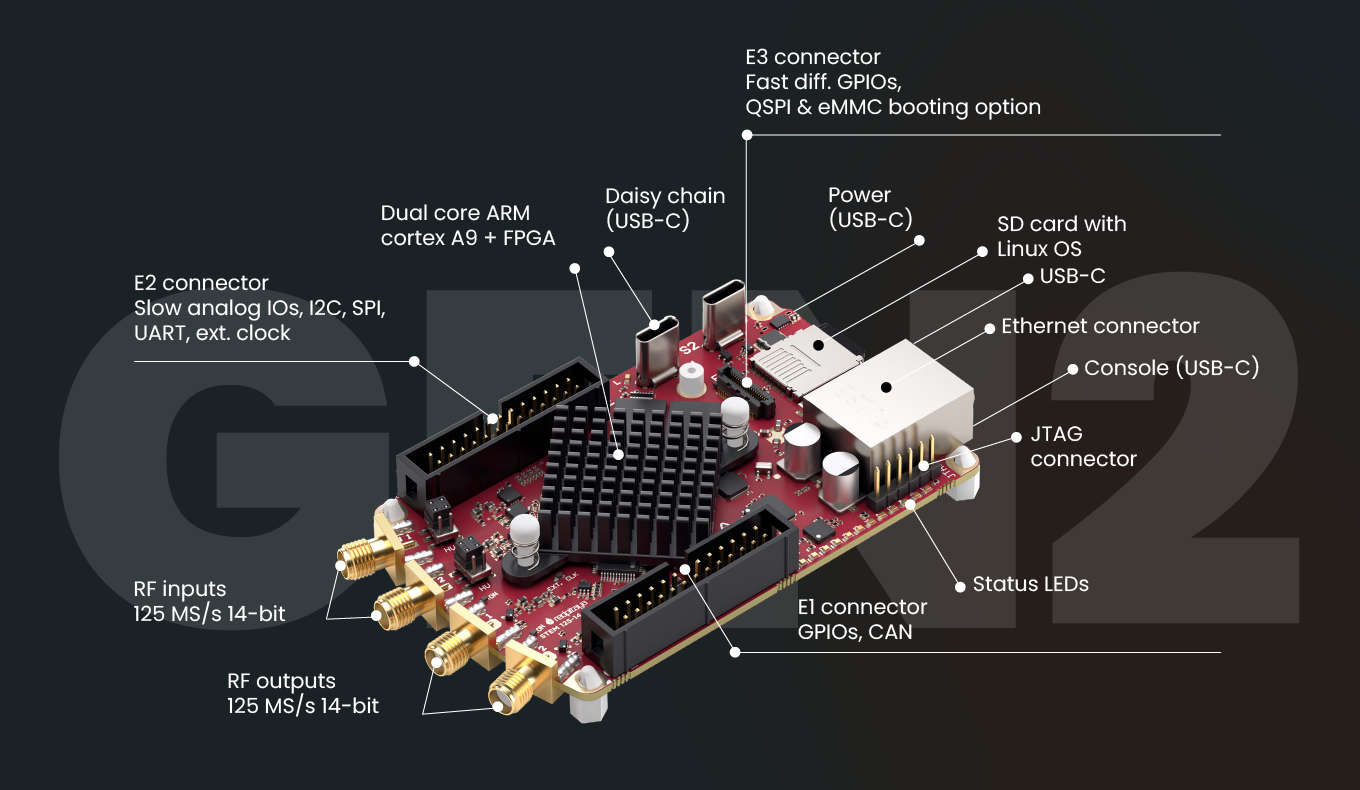
For other external connectors like S1 and S2 synchronisation connectors, power, communication and ethernet ports please see the general Gen 2 picture below.
Technical Specifications
Parameter |
Value |
Units |
Notes |
|---|---|---|---|
|
|||
Processor |
Dual core ARM Cortex-A9 |
- |
|
FPGA |
FPGA AMD (Xilinx) Zynq 7010 SoC |
- |
|
RAM |
512 |
MB |
(4 Gb) |
Core clock frequency |
125 |
MHz |
|
System memory |
Micro SD up to 32 GB |
- |
|
Serial console connector |
USB-C |
- |
|
Power connector |
USB-C |
- |
|
Power consumption |
5 V, 3 A |
- |
max |
|
|||
Ethernet |
1 |
Gbit |
|
USB |
USB-C 2.0 |
- |
|
Wi-Fi |
Requires Wi-Fi dongle |
- |
|
|
|||
RF input channels |
2 |
- |
|
Sampling rate |
125 |
MS/s |
|
ADC resolution |
14 |
bit |
|
Input impedance |
1 MΩ / 10 pF |
- |
|
Full scale voltage range |
±1 (LV)
±20 (HV)
|
V |
|
Input coupling |
DC |
- |
|
Absolute max. input voltage |
±6 (LV)
±30 (HV)
|
V |
DC values [1] |
Input ESD protection |
1500 |
V |
DC |
Overload protection |
Protection diodes |
- |
|
Bandwidth |
DC - 60 |
MHz |
|
Connector type |
SMA |
- |
|
|
|||
RF output channels |
2 |
- |
|
Sampling rate |
125 |
MS/s |
|
DAC resolution |
14 |
bit |
|
Load impedance |
50 Ω / Hi-Z |
- |
|
Voltage range |
±1 @ 50 Ω
±2 @ Hi-Z
|
V |
|
Output coupling |
DC |
- |
|
Short circuit protection |
Yes |
- |
|
Output slew rate |
2 V / 10 ns |
- |
|
RF output jitter @40 MHz |
20 |
ps |
RMS |
Bandwidth |
DC - 60 |
MHz |
|
Connector type |
SMA |
- |
|
|
|||
Digital GPIOs |
16 |
- |
|
Digital voltage levels |
3.3 |
V |
|
High-speed diff. pairs (E3) |
N/A |
- |
|
High-speed diff. pair voltage levels (E3) |
N/A |
- |
|
Analog inputs |
4 |
- |
|
Analog input voltage range |
0 - 7.0 |
V |
|
Analog input resolution |
12 |
bit |
|
Analog input sampling rate |
100 |
kS/s |
|
Analog outputs |
4 |
- |
|
Analog output voltage range |
0 - 1.8 |
V |
|
Analog output resolution |
8 |
bit |
|
Analog output sampling rate |
≲ 3.2 |
MS/s |
|
Analog output bandwidth |
≈ 120 |
kHz |
|
Communication interfaces |
I2C, SPI, UART, CAN |
- |
|
Available voltages |
±5, +3.3 |
V |
|
External ADC clock |
N/A |
- |
|
E3 connector |
N/A |
- |
|
|
|||
External trigger input |
DIO0_P |
- |
E1 connector |
External trigger input impedance |
Hi-Z |
- |
Digital input |
Trigger output |
DIO0_N |
- |
E1 connector [2] |
Daisy chain connectors (S1 & S2) |
N/A |
- |
|
Daisy chain connectors speed |
N/A |
Mb/s |
|
Daisy chain connectors type |
N/A |
- |
|
Ref. clock input |
N/A |
- |
|
Ref. clock frequency |
N/A |
- |
|
Ref. clock connector type |
N/A |
- |
|
|
|||
SD card |
Yes |
- |
|
QSPI |
N/A |
- |
|
eMMC |
N/A |
- |
|
|
|||
Operating Temperature Range |
0 to 55 |
℃ |
With default heatsink |
Operating Humidity Range |
< 90% |
RH |
|
Automatic Shutdown Temperature |
85 |
℃ |
|
|
|||
Size (L x W x H) |
106.8 x 60.0 x 17.9 |
mm |
See Schematics for details |
Warning
Maximum Input Voltage
LV mode: ±6 V absolute maximum
HV mode: ±30 V absolute maximum
Exceeding these values may damage the board permanently.
See also
For more detailed information, please refer to the Gen 2 board comparison table.
Performance & Measurements
You can find the measurements of the fast analog frontend here:
Schematics & 3D Models
Schematics
Note
Full hardware schematics for the Red Pitaya board are not available. Red Pitaya has open-source code but not open hardware schematics. Nonetheless, development schematics are available. This schematic will give you information about hardware configuration, FPGA pin connections, and similar.
Mechanical Specifications & 3D Models
STEP
3D_STEM_125-14-Gen2.zip.
Hardware Details
Key Components
Signal Path Components
The STEMlab 125-14 Gen 2 uses high-performance analog components from Linear Technology (now Analog Devices) for the signal chain.
ADC: Analog Devices LTC2145-14
Dual 14-bit, 125 MS/s ADC
Low power consumption
High dynamic range
DAC: Analog Devices AD9767
Dual 14-bit, 125 MS/s DAC
High SFDR performance
Low power operation
FPGA: AMD (Xilinx) Zynq 7010
Dual-core ARM Cortex-A9 @ 667 MHz
Programmable logic fabric
Integrated peripherals and memory controllers
Oscillator: SG3225VAN
High-precision 125 MHz reference oscillator
Low jitter performance
Extension Connectors & Interfaces
Overview
The STEMlab 125-14 Gen 2 board features the following connectors and interfaces:
E1 and E2 connectors: Primary expansion connectors with digital I/O, analog I/O, and communication interfaces. These connectors allow users to interface with additional hardware, sensors, or peripherals, enhancing the board’s capabilities.
Connector Physical Specifications
E1 and E2 Extension Connectors:
Connector type: 2 x 13 pins IDC 2.54 mm pitch
Pin count: 26 pins each (2x13 configuration)
Pitch: 2.54 mm (0.1”)
Mating Connectors:
Note
When looking for mating connectors for custom Red Pitaya shields, double height elevated sockets are needed to clear the heatsink and ethernet connector on the board. Any connectors with insulation height of 0.635” (16.13 mm) or greater will work. This clearance requirement is based on the tallest components on the Red Pitaya board (heatsink and ethernet connector).
Note
To prevent damage to the board or the shield, when connecting shields to the E1 and E2 connectors, please ensure:
Proper alignment of connectors - ensure the connectors are correctly aligned. The connectors on the Red Pitaya board have additional space in the socket housing, making it possible to misalign the shields by ±1 pin while still appearing physically connected. This can cause damage to the board and/or the shield, so please double-check the alignment before powering on the board.
Tight-fitting counterparts - use connectors that fit securely to prevent accidental disconnections or damage.
E1 Connector - Digital I/O & CAN
The E1 extension connector provides digital I/O and CAN bus interfaces for control and communication applications.
Features:
Two +3V3 power sources (max 0.5 A of current)
16 single-ended or 8 differential digital I/Os with 3.3 V logic levels
Two CAN buses (configurable via software)
Electrical Specifications:
All DIOx_y pins are LVCMOS33, with the following absolute maximum ratings:
Min. voltage: -0.40 V
Max. voltage: 3.3 V + 0.55 V
Drive strength: < 8 mA
E1 Pinout:
Pin |
Description |
FPGA pin number |
FPGA pin description |
Voltage levels |
|---|---|---|---|---|
1 |
3V3 |
|||
2 |
3V3 |
|||
3 |
DIO0_P / EXT TRIG |
G17 |
IO_L16P_T2_35 |
3.3V |
4 |
DIO0_N / TRIG OUT |
G18 |
IO_L16N_T2_35 |
3.3V |
5 |
DIO1_P |
H16 |
IO_L13P_T2_MRCC_35 |
3.3V |
6 |
DIO1_N |
H17 |
IO_L13N_T2_MRCC_35 |
3.3V |
7 |
DIO2_P |
J18 |
IO_L14P_T2_AD4P_SRCC_35 |
3.3V |
8 |
DIO2_N |
H18 |
IO_L14N_T2_AD4N_SRCC_35 |
3.3V |
9 |
DIO3_P |
K17 |
IO_L12P_T1_MRCC_35 |
3.3V |
10 |
DIO3_N |
K18 |
IO_L12N_T1_MRCC_35 |
3.3V |
11 |
DIO4_P |
L14 |
IO_L22P_T3_AD7P_35 |
3.3V |
12 |
DIO4_N |
L15 |
IO_L22N_T3_AD7N_35 |
3.3V |
13 |
DIO5_P |
L16 |
IO_L11P_T1_SRCC_35 |
3.3V |
14 |
DIO5_N |
L17 |
IO_L11N_T1_SRCC_35 |
3.3V |
15 |
DIO6_P / CAN1_RX |
K16 |
IO_L24P_T3_AD15P_35 |
3.3V |
16 |
DIO6_N / CAN1_TX |
J16 |
IO_L24N_T3_AD15N_35 |
3.3V |
17 |
DIO7_P / CAN0_RX |
M14 |
IO_L23P_T3_35 |
3.3V |
18 |
DIO7_N / CAN0_TX |
M15 |
IO_L23N_T3_35 |
3.3V |
19 |
NC |
|||
20 |
NC |
|||
21 |
NC |
|||
22 |
NC |
|||
23 |
NC |
|||
24 |
NC |
|||
25 |
GND |
|||
26 |
GND |
Note
To change the functionality of DIO6_P, DIO6_N, DIO7_P and DIO7_N from GPIO to CAN, please modify the housekeeping register value at address 0x34. For further details, please refer to the FPGA register section.
The change can also be performed with the appropriate SCPI or API command. Please refer to the CAN commands section for further details.
E2 Connector - Analog I/O & Communications
The E2 extension connector provides analog I/O, communication interfaces, and power connections.
Features:
±5 V power sources (max 3 A of current per port)
SPI, UART, I2C communication interfaces
4 slow ADCs (12-bit, 100 kS/s)
4 slow DACs (8-bit PWM, ≲ 3.2 MS/s)
E2 Pinout:
Pin |
Description |
FPGA pin number |
FPGA pin description |
Voltage levels |
|---|---|---|---|---|
1 |
+5 V |
|||
2 |
-5 V |
|||
3 |
SPI (MOSI) |
E9 |
PS_MIO10_500 |
3.3 V |
4 |
SPI (MISO) |
C6 |
PS_MIO11_500 |
3.3 V |
5 |
SPI (SCK) |
D9 |
PS_MIO12_500 |
3.3 V |
6 |
SPI (CS) |
E8 |
PS_MIO13_500 |
3.3 V |
7 |
UART (TX) |
D5 |
PS_MIO8_500 |
3.3 V |
8 |
UART (RX) |
B5 |
PS_MIO9_500 |
3.3 V |
9 |
I2C (SCL) |
B13 |
PS_MIO50_501 |
3.3 V |
10 |
I2C (SDA) |
B9 |
PS_MIO51_501 |
3.3 V |
11 |
Ext com. mode (AIN) |
Ext. GND |
||
12 |
GND |
|||
13 |
Analog Input 0 |
B19, A20 |
IO_L2P_T0_AD8P_35, IO_L2N_T0_AD8N_35 |
0-7.0 V |
14 |
Analog Input 1 |
C20, B20 |
IO_L1P_T0_AD0P_35, IO_L1N_T0_AD0N_35 |
0-7.0 V |
15 |
Analog Input 2 |
E17, D18 |
IO_L3P_T0_DQS_AD1P_35, IO_L3N_T0_DQS_AD1N_35 |
0-7.0 V |
16 |
Analog Input 3 |
E18, E19 |
IO_L5P_T0_AD9P_35, IO_L5N_T0_AD9N_35 |
0-7.0 V |
17 |
Analog Output 0 |
T10 |
IO_L1N_T0_34 |
0-1.8 V |
18 |
Analog Output 1 |
T11 |
IO_L1P_T0_34 |
0-1.8 V |
19 |
Analog Output 2 |
P15 |
IO_L24P_T3_34 |
0-1.8 V |
20 |
Analog Output 3 |
U13 |
IO_L3P_T0_DQS_PUDC_B_34 |
0-1.8 V |
21 |
NC |
|||
22 |
GND |
|||
23 |
NC |
|||
24 |
NC |
|||
25 |
GND |
|||
26 |
GND |
Auxiliary Analog Inputs & Outputs
Auxiliary Analog Input Channels
The E2 connector provides 4 auxiliary analog inputs for slow-speed measurements and sensor interfacing.
Parameter |
Value |
Units |
Notes |
|---|---|---|---|
Number of channels |
4 |
- |
|
ADC resolution |
12 |
bit |
|
Sampling rate |
100 |
kS/s |
|
Input filter bandwidth |
120 |
kHz |
|
Input voltage range |
0 - 7.0 |
V |
|
Input coupling |
DC |
- |
|
Connector |
Extension connector E2 connector |
- |
Pins 13, 14, 15, 16 |
Auxiliary Analog Output Channels
The E2 connector provides 4 auxiliary analog outputs using PWM with low-pass filtering.
Parameter |
Value |
Units |
Notes |
|---|---|---|---|
Number of channels |
4 |
- |
|
Output resolution |
8 |
bit |
|
Sampling rate |
≲ 3.2 |
MS/s |
|
Output filter bandwidth |
200 |
kHz |
|
Output voltage range |
0 - 1.8 |
V |
|
Output coupling |
DC |
- |
|
Output type |
Low pass filtered PWM |
- |
|
PWM time resolution |
8 ns |
ns |
(1/125 MHz) |
Connector |
Extension connector E2 connector |
- |
Pins 17, 18, 19, 20 |
General Purpose Digital I/O Channels
Parameter |
Value |
Units |
Notes |
|---|---|---|---|
Number of GPIOs |
16 |
- |
|
Digital voltage level |
3.3 |
V |
|
Abs. min. voltage |
-0.40 |
V |
|
Abs. max. voltage |
3.3 + 0.55 |
V |
|
Current limitation |
< 8 |
mA |
Drive strength |
Direction |
Configurable |
- |
|
Time resolution |
8 ns |
ns |
(1/125 MHz) |
Connector location |
Extension connector E1 connector |
- |
Advanced Features
Power Supply
Red Pitaya Gen 2 boards support two physical power inputs:
USB-C connector
+5V pin (pin 1) and GND pin (pin 25,26) on the |E2| connector
The sections below describe the supported powering scenarios and their implications.
External Power Specifications:
Parameter |
Specification |
|---|---|
Power supply voltage |
5 V |
Maximum current draw |
3.0 A |
Power supply type |
DC |
Abs. max. voltage |
5.5 V |
Abs. min. voltage |
4.5 V |
Note
The board’s maximum current draw is 3.0 A. The power supply may have a higher current rating — this will not cause any issues.
Note
Why is power protection implemented? The USB-C protection circuit was introduced because boards were being powered from computer USB ports, which typically provide 0.5–0.9 A — insufficient for reliable operation and likely to cause reboots and network disconnections.
Powering scenario 1 — Recommended: USB-C with a standard USB-C power supply
Connect a USB-C power supply (5 V, 3 A) with functional CC lines to the USB-C connector. Leave jumper JP5 unbridged (default).
The USB-C protection circuit detects the CC lines and confirms the supply is USB-C compliant.
The Power Error LED remains off, indicating normal operation.
Full overcurrent protection (3.0 A PTC resettable fuse) is active.
Note
A USB-C power supply without CC lines (e.g. a simple 2-wire USB-C cable with a generic 5 V adapter) will not satisfy the protection circuit and will cause the Power Error LED to light up, as described in scenario 2b below.
Powering scenario 2 — Alternative: 2-pin (non-USB-C) power supply
If a 2-wire 5 V power supply is used (no CC lines), there are two connection options:
2a — Via the E2 connector (+5V pin)
Connect the supply directly to pin 1 (+5V) and pin 25/26 (GND) on the E2 connector connector. The JP5 jumper state does not matter in this case.
The USB-C protection logic is entirely bypassed — the protection circuit is not in the power path.
The 3.0 A PTC resettable fuse on the E2 connector +5V pin remains active for overcurrent protection.
The Power Error LED will be on, because the USB-C protection circuit receives board power but no CC line signal.
2b — Via the USB-C connector
Connect the 2-wire supply through the USB-C connector. JP5 must be bridged to allow power flow in this configuration.
The USB-C protection circuit is in the power path and receives power, but receives no CC line signal.
The Power Error LED will be on — this is expected behaviour, not a fault.
It is the user’s responsibility to verify that the supply provides a stable 5 V at up to 3 A.
Warning
When using scenario 2 (either sub-option), the Power Error LED being on is expected and does not indicate a hardware fault. It indicates that the USB-C protection circuit cannot verify the connected supply’s compliance. The user must ensure the supply meets the 5 V / 3 A specification independently.
Available Power Rails on Extension Connectors:
The E1 connector and E2 connector connector expose several power rails that can be used to supply power to external devices or circuits connected to the board. The current limits below are the maximum currents that Red Pitaya can source from each rail to external loads — they are not related to the board’s own power consumption.
Voltage Rail |
Max. Sourceable Current |
|---|---|
+5 V |
0.5 A [5] |
-5 V |
0.1 A |
+3V3 |
0.5 A [5] |
Note
Exceeding these limits may cause voltage rail instability or trigger the board’s protection circuitry, which can result in a board reset or shutdown.
The +5V pin on E2 connector (pin 1) also serves as a power input when using powering scenario 2a. In that role it is protected by a 3.0 A PTC resettable fuse located on the PCB near the E2 connector connector.
Calibration
Red Pitaya Gen 2 boards are factory-calibrated. Recalibration may be required after extended use, environmental changes, or when measurement accuracy degrades.
There are three ways to calibrate the board:
Calibration application — graphical interface accessible from the System Tools menu. Recommended for most users.
Calibration command line utility (calib) — command line tool for scripted or advanced calibration workflows.
C++ or Python API commands — programmatic access to calibration parameters.
For a full description of the calibration procedure, required equipment, and technical reference, please refer to the Calibration documentation.
Note
Gen 2 boards do not require 50 Ω terminators during calibration, unlike the original generation boards. The improved analog front-end circuitry eliminates this requirement.
Additional Resources
For additional specifications and measurements, please refer to:
Gen 2 hardware specifications - Common Gen 2 specifications
Gen 2 board comparison table - Comparison across all Red Pitaya Gen 2 models
Legal & Disclaimers
Note
The information provided by Red Pitaya d.o.o. is believed to be accurate and reliable. However, no liability is accepted for its use. Please note that the contents may be subject to change without prior notice.
Footnotes