Split trigger acquisition (STEMlab 125-14 4-Input)
Note
We plan to expand this functionality to other Red Pitaya models in the future.
Description
Normally data acquisition on Red Pitaya has only one trigger for all channels, but with split trigger mode each channel can have its own trigger. This example shows how to acquire 6000 samples of a signal on all 4 fast analog inputs in split trigger mode. As each channel has its own trigger, acquisition on a channel starts when the channel trigger condition is met. The decimations and time scales of a buffer are specified in the sample rate and decimation. Voltage and frequency ranges depend on the Red Pitaya model.
Required hardware
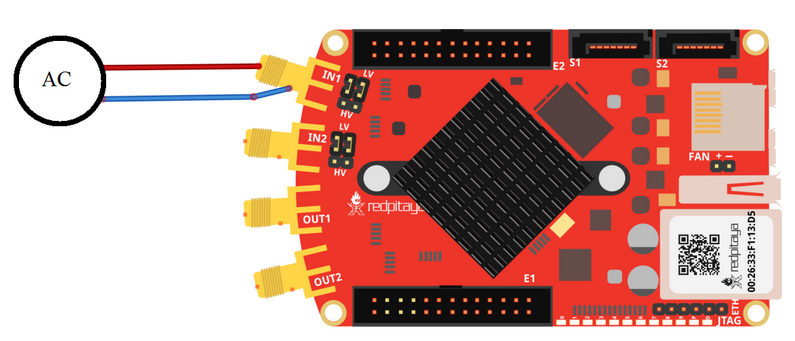
Red Pitaya STEMlab 125-14 4-Input
Signal (function) generator
Wiring example:
Required software
2.05-37 or higher OS
Note
This code is written for 2.05-37 or higher OS. For older OS versions, please check when specific commands were released (a note is added to each command introduced in 2.00 or higher verisons).
SCPI Code Examples
Note
With the latest OS versions you can use ACQ:DEC:F <decimation_factor> command for more precise control over the acquisition. The decimation factor can be any of [1, 2, 4, 8, 16, 17, 18, 19, ..., 65535, 65536].
Code - MATLAB®
The code is written in MATLAB. TCP client communication is used to establish socket communication with Red Pitaya, then SCPI commands are sent to configure the various Red Pitaya peripherals. Copy the code below into the MATLAB editor, save the project and press the Run button. Tested on MATLAB 2024b.
% Example of using the Red Pitaya SCPI commands to acquire data from all 4 channels in split trigger mode.
%% Define Red Pitaya as TCP/IP object
close all
clc
IP = 'rp-f0b506.local';                % Input IP of your Red Pitaya...
port = 5000;
RP = tcpclient(IP, port);

ch_num = 4;
data_format = "ascii";   % bin
data_units = "volts";    % raw
dec = [64 64 64 64];
trig_lvl = 0.1;
triggers = ["CH1_PE", "CH2_PE", "CH3_NE", "CH4_NE"];     % one parameter for each channel
trig_ord = 1:ch_num;                                     % Randomize trigger channel check order
trig_ord = trig_ord(randperm(length(trig_ord)))

%% Open connection with your Red Pitaya
RP.ByteOrder = 'big-endian';
configureTerminator(RP,'CR/LF');
flush(RP);

% Reset acquisition
writeline(RP,'ACQ:RST');

% Activate split trigger mode
writeline(RP,'ACQ:SPLIT:TRig ON');

% Reset specific channels
for i = 1:ch_num
    writeline(RP, append('ACQ:RST:CH', num2str(i)));
end

% Configure settings for channels
writeline(RP, append('ACQ:DATA:FORMAT ', upper(data_format)));
writeline(RP, append('ACQ:DATA:Units ', upper(data_units)));

for i = 1:ch_num
    writeline(RP, append('ACQ:DEC:Factor:CH', num2str(i), ' ', num2str(dec(i))));
    writeline(RP, append('ACQ:TRig:LEV:CH', num2str(i), ' ', num2str(trig_lvl)));
end

% Start acquisition on each channel separately
for i = 1:ch_num
    writeline(RP, append('ACQ:START:CH', num2str(i)));
end

% Set triggers for each channel
for i = 1:ch_num
    writeline(RP, append('ACQ:TRig:CH', num2str(i), ' ', upper(triggers(i))));
    fprintf("Acq set\n");
end

% Check for buffer fill conditions in random order
for i = 1:ch_num
    while 1
        fill_state = writeread(RP, append('ACQ:TRig:FILL:CH', num2str(trig_ord(i)),'?'));
        if strcmp('1', fill_state(1:1))
            break;
        end
    end
    fprintf('CH%d trig\n', trig_ord(i));
    writeline(RP, append('ACQ:STOP:CH', num2str(i)));
end

% Get data from each chanel and combine them into an array
buffers = [];
for i = 1:4
    buff_str = writeread(RP, append('ACQ:SOUR', num2str(i),':DATA:TRig? 6000,POST_TRIG'));     % Retrieve 6000 samples after trigger + trigger
    buff = str2num(buff_str(2:length(buff_str)-1));
    buffers = cat(1, buffers, buff);
end

%% Plot the results
x = 1:6001;
tiledlayout(ch_num,1)
for i = 1:ch_num
    nexttile
    plot(x, buffers(i,:))
    title(append("ADC data ", num2str(i)))
end

clear RP;
Code - Python
SCPI commands:
#!/usr/bin/python3
"""Example of using the Red Pitaya SCPI commands to acquire data from all 4 channels in split trigger mode."""

import numpy as np
import matplotlib.pyplot as plot
import redpitaya_scpi as scpi

# Parameters for all channels
ch_num = 4
data_format = "ascii"   # bin
data_units = "volts"    # raw
dec = [64, 64, 64, 64]
trig_lvl = 0.1
triggers = ["CH1_PE", "CH2_PE", "CH3_NE", "CH4_NE"]     # one parameter for each channel
trig_ord = np.array(np.arange(1, ch_num+1))
np.random.shuffle(trig_ord)
print(trig_ord)

# Connect to 4-Input Red Pitaya
IP = "rp-f0b506.local"
rp = scpi.scpi(IP)

# Reset acquisition
rp.tx_txt('ACQ:RST')

# Activate split trigger mode
rp.tx_txt('ACQ:SPLIT:TRig ON')

# Reset specific channels
for i in range(ch_num):
    rp.tx_txt(f'ACQ:RST:CH{i+1}')

# Specify return format and units
rp.tx_txt(f'ACQ:DATA:FORMAT {data_format.upper()}')
rp.tx_txt(f'ACQ:DATA:Units {data_units.upper()}')

# Set decimation for each channel
for i in range(ch_num):
    rp.tx_txt(f'ACQ:DEC:Factor:CH{i+1} {dec[i]}')
    rp.tx_txt(f'ACQ:TRig:LEV:CH{i+1} {trig_lvl}')

# Start acquisition on each channel separately
for i in range(ch_num):
    rp.tx_txt(f'ACQ:START:CH{i+1}')

# Set triggers for each channel
for i in range(ch_num):
    rp.tx_txt(f'ACQ:TRig:CH{i+1} {triggers[i].upper()}')
print("Acq set")

# Check for fill conditions in random order
for i in trig_ord:
    print(i)

for i in trig_ord:
    while 1:
        rp.tx_txt(f'ACQ:TRig:FILL:CH{i}?')
        if rp.rx_txt() == '1':
            break
    print(f"CH{i} trig")
    rp.tx_txt(f'ACQ:STOP:CH{i}')             # Stop

# Get data from each chanel and combine them into an array
buffers = []
for i in range(1, 5):
    rp.tx_txt(f'ACQ:SOUR{i}:DATA:TRig? 6000,POST_TRIG')     # Retrieve 6000 samples after trigger
    buff_string = rp.rx_txt().strip('{}\n\r').replace("  ", "").split(',')
    buffers.append(np.array(buff_string, dtype=float))

# Convert list of buffers to a 2D NumPy array
buffers = np.array(buffers)

# Plot the results
fig, axs = plot.subplots(ch_num)
fig.suptitle('ADC data')

for i in range(ch_num):
    axs[i].plot(buffers[i])
    axs[i].set_title(f'Channel {i+1}')

plot.show()
rp.close()
API Code Examples
Note
The API code examples don’t require the use of the SCPI server. Instead, the code should be compiled and executed on the Red Pitaya itself (inside Linux OS). Instructions on how to compile the code and other useful information are here.
Code - C++ API
    /* Red Pitaya C++ API example for acquiring data from all 4 channels in split trigger mode */
#include <stdlib.h>
#include <unistd.h>
#include <iostream>
#include <algorithm>
#include <random>
#include <chrono>
#include "rp.h"

void mixArray(int *array, int n);

int main(int argc, char **argv){
    int res;
    int ch_num = 4;
    rp_channel_t ch[ch_num] = {RP_CH_1, RP_CH_2, RP_CH_3, RP_CH_4};
    rp_channel_trigger_t ch_trig[ch_num] = {RP_T_CH_1, RP_T_CH_2, RP_T_CH_3, RP_T_CH_4};
    uint32_t decimation[ch_num] = {64, 64, 64, 64};
    float trig_lvl[ch_num] = {0.1, 0.1, 0.1, 0.1};
    int trig_dly[ch_num] = {0, 0, 0, 0};
    rp_acq_trig_src_t trig_src[ch_num] = {RP_TRIG_SRC_CHA_PE, RP_TRIG_SRC_CHB_PE, RP_TRIG_SRC_CHC_NE, RP_TRIG_SRC_CHD_NE};
    uint32_t acq_trig_pos[ch_num] = {0, 0, 0, 0};
    int trig_ord[ch_num] = {1, 2, 3, 4};

    mixArray(trig_ord, ch_num);
    for (int i = 0; i < ch_num; i++)
        std::cout << trig_ord[i] << " ";
    std::cout << std::endl;

    if(rp_Init() != RP_OK){
        std::cerr << "Rp api init failed!" << std::endl;
    }

    /* Reserve space for data */
    uint32_t buff_size = 6001;
    float **buff = (float **)malloc(ch_num * sizeof(float *));
    for(int i = 0; i < ch_num; i++){
        buff[i] = (float *)malloc(buff_size * sizeof(float));
    }

    rp_AcqReset();
    rp_AcqSetSplitTrigger(true);                            // Enable split trigger mode

    /* Configure acquisition settings for each channel */
    for(int i = 0; i < ch_num; i++){
        rp_AcqResetCh(ch[i]);
        rp_AcqSetDecimationFactorCh(ch[i], decimation[i]);  // Decimation factor
        rp_AcqSetGain(ch[i], RP_LOW);
        rp_AcqSetTriggerLevel(ch_trig[i], trig_lvl[i]);
        rp_AcqSetTriggerDelayCh(ch[i], trig_dly[i]);
        rp_AcqStartCh(ch[i]);                               // Start acquisition on channel
        rp_AcqSetTriggerSrcCh(ch[i], trig_src[i]);          // Set channel trigger source
    }

    /* Wait for trigger and buffer full */
    for (int i = 0; i < ch_num; i++){
        bool fillState = false;
        while(!fillState){
            rp_AcqGetBufferFillStateCh(ch[trig_ord[i]-1], &fillState);
        }
        std::cout << "Channel " << trig_ord[i] << " data acquired" << std::endl;
    }

    /* Get data */
    for(int i = 0; i < ch_num; i++){
        rp_AcqGetWritePointerAtTrigCh(ch[i], &acq_trig_pos[i]);
        std::cout << "Channel " << trig_ord[i] << " trig position " << acq_trig_pos[i] << std::endl;
        res = rp_AcqGetDataV(ch[i], acq_trig_pos[i], &buff_size, buff[i]);
        if(res != RP_OK){
            std::cout << "Error: " << res << std::endl;
        }
    }

    /* Print data */
    for(int i = 0; i < ch_num; i++){
        std::cout << "Channel " << i+1 << std::endl;
        for(int j = 0; j < 100; j++){        //(int)buff_size
            std::cout << buff[i][j];
            if (j != 100 -1){     //(int)buff_size -1
                std::cout << ", ";
            }
        }
        std::cout << std::endl << std::endl;
    }

    /* Release resources */
    for(int i = 0; i < ch_num; i++) {
        free(buff[i]);
    }
    free(buff);

    rp_Release();
    return 0;
}


void mixArray(int *array, int n){
    /* Randomly shuffle the array */
    unsigned seed = std::chrono::system_clock::now().time_since_epoch().count();
    std::shuffle(array, array + n, std::default_random_engine(seed));
}
Code - Python API